Yelva Chat · for WooCommerce
AI customer support that never goes quiet.
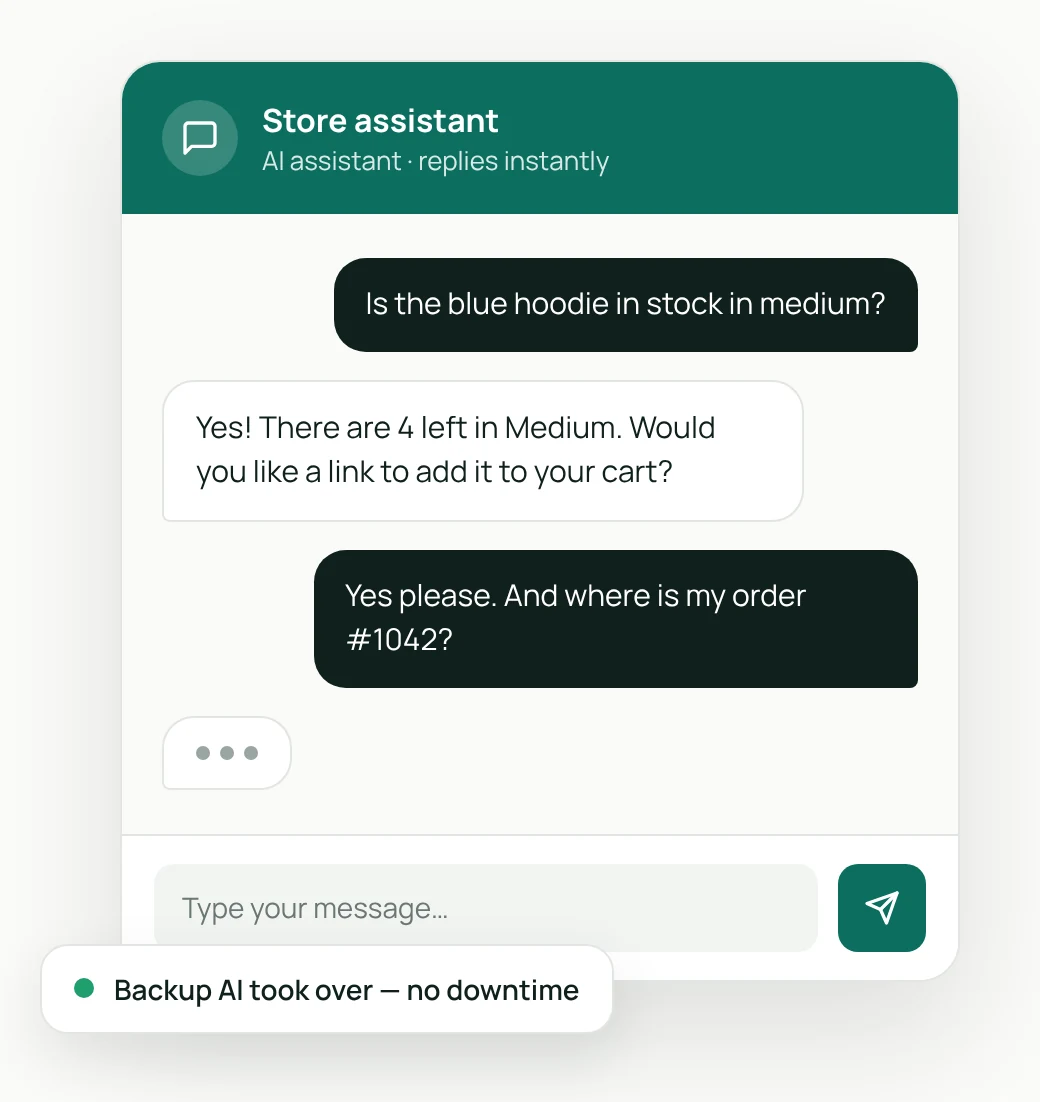
Yelva Chat answers your customers’ questions about products, stock and orders, day and night. If an AI service fails, a backup takes over, so customers never see an error.
Free version available · Pro from $59 a year · 14-day money-back guarantee
How it works
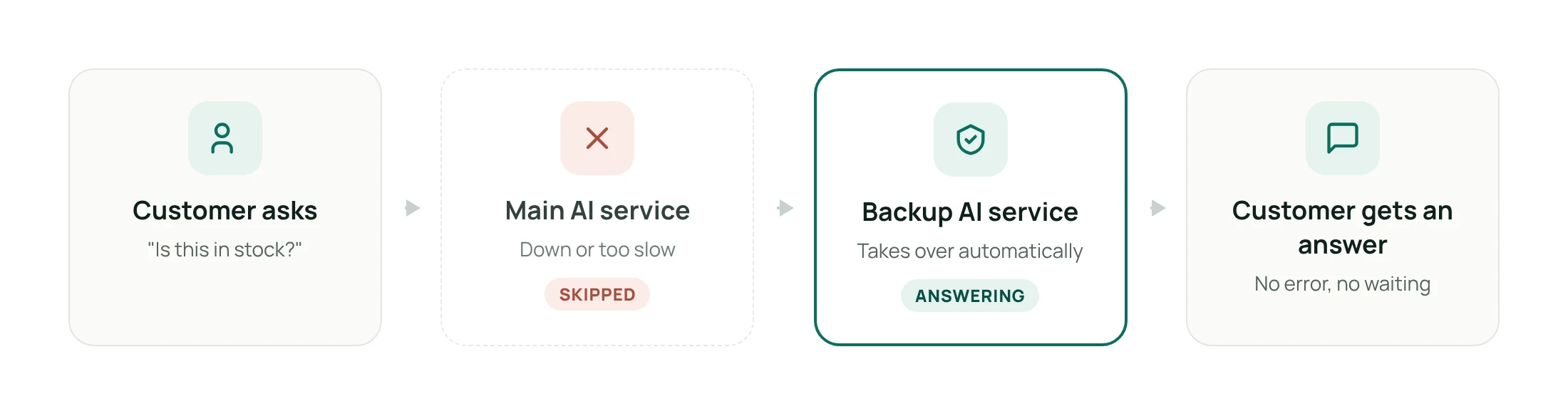
If one AI service fails, another takes over.
Most chat assistants depend on a single AI service. When it’s busy, rate-limited or down, your customers see an error, often at your busiest time. Yelva Chat keeps a backup ready and switches automatically.
Features
Everything a small store needs to answer customers.
Start free with the essentials. Pro adds deeper store knowledge, live takeover and full control.
Free vs Pro
Compare the versions.
| Feature | Free | Pro |
|---|---|---|
| AI services you can connect | 2 (main + backup) | Up to 4 |
| Automatic switch to a backup AI | ✓ | ✓ |
| Use your own AI accounts (no per-message fees) | ✓ | ✓ |
| Product answers | Name, price, description | Plus stock, variations, categories |
| Order status answers | — | ✓ |
| Store knowledge (shipping, returns and more) | Add one by one | Plus bulk import |
| Human-like typing and reply timing | — | ✓ |
| Tuning: reply length, limits, chat memory | Standard | Fully adjustable |
| Live human takeover | — | ✓ |
| Where the chat shows | Every page or homepage | Any page, with page rules |
| Window title, message hint and AI label wording | Standard text | Fully customisable |
| “AI assistant” label (on/off) | ✓ | ✓ |
| Contact link button | ✓ | ✓ |
| Unanswered questions report (opt-in) | — | ✓ |
| Automatic chat clean-up | — | Day, week, month or year |
| “Powered by Yelva” link | Shown | Can be hidden |
| Updates | ✓ | ✓ |
| Support | Community forum | Priority email |
Pricing
Simple yearly pricing.
Every Pro plan includes every Pro feature. Plans differ only in how many websites you can use them on.
Free
$0 forever
For trying Yelva Chat on your store.
- Main and backup AI service
- Automatic backup switching
- Product and store answers
- “AI assistant” label
- Every page or homepage only
- Community support
Pro Starter
$59 / year
For 1 website.
- Every Pro feature
- Up to 4 AI services
- Stock, variations and order answers
- Human-like typing and tuning
- Live human takeover
- Page rules and custom wording
- Bulk knowledge import
- Automatic chat clean-up
- Priority email support
Most popular
Pro Business
$129 / year
For up to 5 websites.
- Every Pro feature
- Up to 4 AI services
- Stock, variations and order answers
- Human-like typing and tuning
- Live human takeover
- Page rules and custom wording
- Bulk knowledge import
- Automatic chat clean-up
- Priority email support
Pro Agency
$249 / year
For up to 25 websites.
- Every Pro feature
- Up to 4 AI services
- Stock, variations and order answers
- Human-like typing and tuning
- Live human takeover
- Page rules and custom wording
- Bulk knowledge import
- Automatic chat clean-up
- Priority email support
14-day money-back guarantee · Cancel anytime · Prices in US dollars. Tax is added at checkout where required.
Get Yelva Chat
Launching soon on WordPress.org.
Yelva Chat is in final testing. Want to know the moment it’s ready? Send us a quick email and we’ll tell you. We’ll only use your address for this one message.
FAQ
Questions about Yelva Chat
Do I need an account with an AI service?
Yes. Yelva Chat uses your own API key from an AI service, so your costs and usage stay in your hands. Some AI services offer a free tier, which is often enough for a small store. The docs explain how to get a key.
Is the number of messages limited in the free version?
Yelva doesn’t limit messages in either version. The only limits are the ones set by the AI service you connect, such as a free tier’s daily allowance.
How many AI services can I connect?
The free version connects two: a main service and a backup. Pro connects up to four, and you choose the order they’re tried in.
Where are conversations stored?
Conversations are stored in your own WordPress database and sent only to the AI services you connect. Yelva doesn’t receive your customers’ chats. You can delete old chats at any time, and Pro can do it automatically.
Will it slow down my store?
No. The chat window is small and loads only on the pages where you show it. It doesn’t load on pages where it’s switched off.
Does it work with my theme?
Yelva Chat works with any well-coded WordPress theme, including block themes and classic themes. The chat window sits on top of your page, so it doesn’t change your layout.
Do I need WooCommerce?
Yelva Chat is built for WooCommerce stores. WooCommerce must be installed for product and order answers.
Can I cancel Pro or get a refund?
You can cancel your Pro subscription at any time, and it won’t renew. If Yelva Chat Pro isn’t right for you, ask for a refund within 14 days of payment and you’ll get your money back. See our refund policy.
Ready to stop missing customer questions?
Install the free version today, or go Pro for live takeover, order answers and full control.